Here’s an RAQ from Katie M:
I am currently using wordpress.org for a few blogs. I am setting up for some doctors and another blog for another pilot program … so doctors can learn from each other…I am wanting to have the similar option that you have for subscribing, that is via e-mail. How do I go about doing this?
The answer is pretty straightforward.
I recommend that you use Feedburner to replace your blog’s RSS feed with one that gives you more features, particularly better tracking. Feedburner is free, and among its built-in benefits is the ability to let your readers subscribe by email.
Here’s how you can add a subscription form to a sidebar widget on your blog, assuming you have set up a Feedburner account and “burned” your feed.
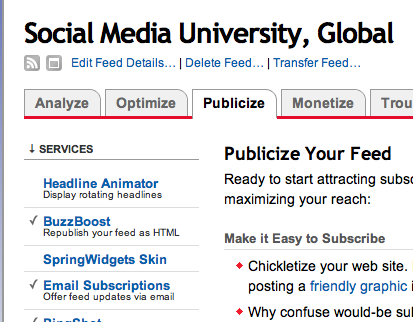
First, log in to your Feedburner account, go to your feed and click the “Publicize” tab and then choose Email Subscriptions
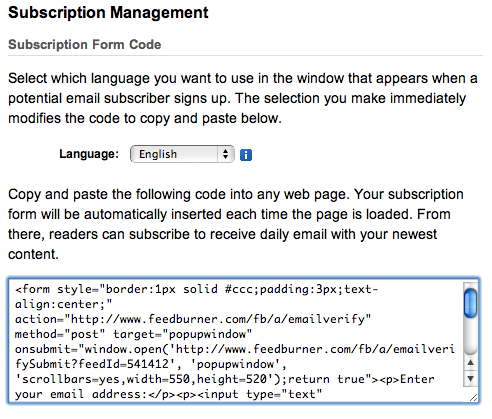
Then copy the code for the widget into your clipboard:
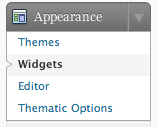
Now go to your WordPress dashboard, and under Appearance click Widgets
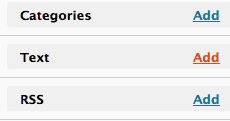
On the left side, click the Add link to create a new Text widget in your sidebar:
Then click the Edit link

and paste in the code from Feedburner into your widget, and give your widget a title as you see below:
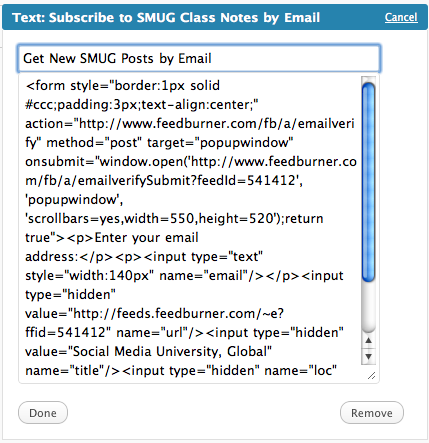
After you click Done and Save Changes, your final form will look like this:
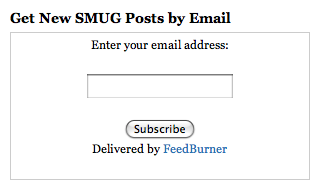
That’s all there is to it. You can do something similar in WordPress.com, but instead of the subscription form you need to use the Subscription Link Code option, which adds a plain HTML link:
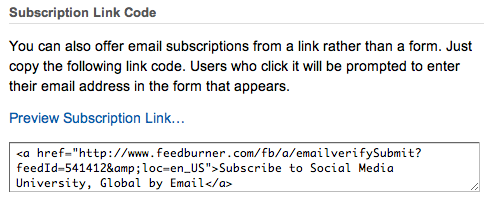
This illustrates another advantage of self-hosted WordPress over WordPress.com, in that you aren’t limited to just a link in your sidebar widget. I appreciate Katie’s question, because it encouraged me to update my sidebar and include the form instead of the plain HTML link.
I know there are other plug-ins that you can install, and which can provide email delivery of posts, but I like the statistics I get with Feedburner, both for my email subscribers and those who take the RSS feeds.
Assignment:
Follow the steps above and add an email subscription option to your blog, either via a form or a subscription link, through a text widget.

Cool post, thanks for walking us through that, much appreciated !
I tried to get the form on, nothing worked, so I stayed with the link. I did later manage to get a link that they would click which brought up a new feedburner window with a form in it, but no form appears on my blog
My next question is about “FeedFlare”….I would love to embed those little links at the bottom of the post which would allow a person to “Share on Facebook” “email this” or “email the author” But the instructions tell me “Note: The following instructions are not for use with blogs hosted WordPress.com or any WordPress MU–powered installation.
In order to add FeedFlare to a WordPress-powered blog, you’ll need to insert a small piece of code near the post metadata (author, date, comments, etc) in your templates. Fortunately, this is really easy (really!) — just follow these steps……”
Yeah! Thank you for walking me through this. Now my doctors can subscribe.